Thursday, 3 February 2011

First Impressions Using Android Honeycomb, Google’s iPad Rival

First Impressions Using Android Honeycomb, Google’s iPad Rival: "

This morning Google held an event to showcase Android Honeycomb, the new version of the mobile OS that is focused on tablets. There wasn’t much news around the OS — we’ve seen it previewed in a few demos — but the team did show off some of Honeycomb’s slickest features, like widgets and an improved 3D rendering engine.


But what about actually using the tablet OS? For all the whiz-bang previews we’ve seen, very few people have actually written about what it’s like to use these tablets. Unfortunately today’s event wasn’t the ideal place to do a full hands-on, either — there were dozens of reporters and only four tablets (most people got to play with one for maybe five minutes). But I wanted my fill of Honeycomb, so I stuck around til the crowd finally died down, put on my blinders, and took the Motorola Xoom for a 20+ minute spin. Apologies to the guy waiting behind me — I honestly didn’t realize you were there.


Here are some of the features and apps that stood out — be sure to check out the video below for some of these in action.


The Action Bar


One of the most drastic changes is the move from dedicated hardware buttons to access Menu options to the ‘Action Bar’ — a UI element at the top of the screen with options that change depending on whatever application you’re using.


If you’re in the tablet’s browser (which is based on Google Chrome) then this is where you’ll find your open tabs. If you’re in the movie editing app, it’s where you’ll find buttons to import a new clip — but if you hold your finger down on a section of a clip then the Action Bar will populate with options to add a transition or text overlay. In other words, the Action Bar changes dynamically based on what you’re doing in an application.


Most applications also include a Settings button in the far righthand side of the Action Bar, though this is only a convention and not a rule.


In practice the system seems to work well, and you’ll find that you instinctively look toward the Action Bar whenever you want to find an application option or setting that isn’t part of the main UI. Of course, developers are in complete control over what appears in the Action Bar so there could be some consistency issues. But at least people will actually be able to find these options, which is more than can be said about the options hidden behind the ‘Menu’ button on current versions of Android (which many people never hit).


Browser


Kicks the pants off of the iPad’s browser. Tabs are great, and the fact that the tablet browser syncs with your desktop version of Google Chrome is very nice. Scrolling felt smooth. And there’s Incognito Mode.


Gmail


We’ve seen it showcased a few times now, but Gmail for Honeycomb is awesome — it’s like the iPad-optimized web version of Gmail, but without the slight lag you still find on browser apps. I want it badly.


Copy And Paste


I’ve never cared about copy & paste nearly as much as the people who spend their time complaining about its implementation on the web. But I know you’re out there, so here’s some good news: it’s works well on Honeycomb.


If you’ve used Android Gingerbread you’re already familiar with the orange arrows that appear when you go to highlight text. These work pretty well, but there’s one problem: there’s no button to choose what you want to do with that text (the solution is to simply tap the highlighted text, which copies it to the clipboard, but some sort of menu overlay would be nice).


Things are much better in Honeycomb: when you highlight text, the Action Bar changes from its current options to let you Cut, Copy, Paste, or Select All. Is it exciting? Not at all. But it’s a good example of how the Action Bar changes depending on what you’re doing, and I’m sure some of you are going to be over the moon about this.


Android Market


The UI of Android Market has been revamped for the tablet. I think it’s pretty ugly: the ‘Android Green’ striped lines feel almost like placeholder graphics and it doesn’t look nearly as attractive as iOS’s App Store. But it gets the job done.


Movie Studio


It hasn’t gotten much press, but there’s a new application included as part of the Honeycomb suite of Google applications: Movie Studio. I didn’t spend too much time in this, but it includes the features you’d expect: transitions between clips, text overlays, and so on. The UI isn’t what you’d call pretty and it may leave some people scratching their heads, but it’s a nice app to have.


Performance


In general Honeycomb felt snappy — you can see in the video that there’s never really any lag. I did notice some slight jittering when dragging widgets, but was later shown a more recent build of the OS that seemed to fix this. And the fact that the Xoom has 1GB of RAM means that you aren’t going to find your browser tabs emptying the way they do on the current iPad.


Ease of Use


One of my biggest questions about Android tablets concerns usability. I believe that the iPad has been a hit in part because it is a simpler alternative to normal desktop operating systems, while still providing plenty of functionality for people who primarily surf the web, email, and watch videos. Many people buy iPads not just because they like the form factor, but because they want a computer that won’t prompt them with endless security alerts, software updates, and confusing installation processes.


Android Honeycomb is decidedly more complex than the iPad. Instead of a single hardware button used to jump back to the home screen, as there is on iOS, Honeycomb uses a soft button in the bottom left hand corner of the screen. And maybe it’s just me, but the home button doesn’t even look that much like a home button (it could pass as an ‘up’ arrow, especially given the fact that the adjacent Back button is an arrow pointing left).


And some of Honeycomb’s improvements over iOS could also be considered possible stumbling blocks. If you long-press the desktop, you’ll bring up the widget/wallpaper selector, which some people will undoubtedly activate accidentally (and promptly panic). The third button in the bottom left corner lets you jump between recently used applications — a feature that I’ll love, but could confuse people who aren’t sure what’s going on.


But overall the OS is pretty easy to get the hang of. I’d still feel more comfortable handing an iPad to my mother (who absolutely loves hers, for what it’s worth), but the learning curve with Honeycomb isn’t very steep.


And For Those Who Like A Bit More Power…


If you’re comfortable doing more on your computer than email and browsing the web — and have ever felt a little restrained using an iPad — then Honeycomb may feel like a breath of fresh air.


Your home screen is no longer simply a grid of your favorite applications — it’s a dashboard populated with content, like your recent emails, favorite chat buddies, weather, to-do list, and more. Widgets aren’t anything new for Android, but they’ve always been cumbersome on mobile devices because screen real estate is so limited (I’ve found myself debating between keeping my Calendar widget or giving myself an extra row of apps on my phone’s home screen).


On Honeycomb this is much less of an issue. Widgets are the sort of thing that prove their worth over time (as opposed to during a 20 minute demo), but my initial hunch is that people will love them.


Honeycomb also features a new notification system that reminds me of Growl on Mac OS X. New updates slide into view in the bottom right-hand corner of the screen, and you don’t have to squint to see them the way you do on Android phones. Again, very nice.


This is a big advantage for Android now, but I’ll be surprised if the next version of iOS doesn’t include widgets and notifications. Then again, I was surprised that the last version didn’t include them, so who knows.


The Xoom Hardware


The first Honeycomb tablet is the Motorola Xoom, which will probably ship in the next month (the release date hasn’t been announced yet). From a hardware perspective the tablet feels fine. It’s not great — it feels a little too heavy for its size, and I wish the screen resolution were higher — but it’s good enough for people itching to get their hands on an Android tablet.


And if you don’t like the Xoom there will be plenty of other choices in the coming months. Judging Honeycomb based on the Xoom would be like judging Android based on the G1 (okay, okay — maybe the HTC Hero).


Outlook


During the last Apple earnings call, Apple COO Tim Cook dismissed existing Android tablets as “bizarre“. And rightly so — they took an OS that was designed with mobile phones in mind, scaled them up to larger screens, and told consumers they were good to go. The Galaxy Tab was supposedly selling anyway, until it was revealed that previously released figures were misleading and that actual sales were quite small. Which shouldn’t surprise anyone who actually used one. Update: Apparently the Samsung exec who said sales were “quite small” was misquoted — he said “quite smooth“. I still don’t think it’s nearly as good as the iPad.


But Honeycomb changes all that. It’s a solid competitor to iOS — better, even, in some ways. I won’t be at all surprised if we see Honeycomb explode on tablets the way Android has exploded on mobile handsets since the original Droid launched in November 2009. Yes, carriers and OEMs will undoubtedly add their own skins and bundled applications, but provided they don’t do anything too outrageous to the user experience, Honeycomb feels like a winner.


Related:


Honeycomb Is The First Shot Fired Along Apple’s Bow


In-App Purchasing Finally Coming To Android; Disney Brings Tap Tap Revenge To Take Advantage


Google Unveils Android Market Webstore. It’s Already Live!


Android Honeycomb Livestream Is Happening Now


Live From Google’s Android Honeycomb Event


Here’s What Pulse Will Look Like On Android Honeycomb


"

Wednesday, 2 February 2011

Steve Jobs to Media Companies: My Way or the Highway

Steve Jobs to Media Companies: My Way or the Highway: "


Apple caused a minor firestorm of criticism on Tuesday after it rejected Sony’s eReader app from the app store, saying the service had to allow in-app purchases as well as those that take place on Sony’s website. The company later clarified that this was always the rule for apps, but it’s cracking down on the practice now, and requiring all apps which allow external purchases to also offer in-app purchases — which go through the Apple payment system, and therefore give the company its standard 30-percent cut of every sale.


The news caused all kinds of consternation, but the deal is really very simple: If you want to use Apple as your distribution platform, you have to pay the piper. That’s a useful lesson for media companies to learn, although it’s probably too late for most.


Be Careful What You Wish For


When the first rumors about the imminent launch of an Apple iPad started circulating, many media outlets leaped at the chance to partner with the company and get their content on the new device. At the time, I (and others) warned that the new tablet was unlikely to be the solution to the problems of the media industry — and that publishers should also be careful what they wished for. By giving media companies an all-in-one platform for reaching readers and viewers and potentially selling them content via iPad apps (although that hasn’t been going all that well so far), Apple was also effectively locking down its control over that distribution channel and the relationship with those users.


This became obvious when some media outlets started negotiating with Apple about a subscription-based newsstand — a service the company is expected to announce tomorrow, as part of the launch of Rupert Murdoch’s highly-touted new iPad-only publication, The Daily. Apple balked at the idea of giving publishers access to any of the subscription or user data that would come from such an arrangement, saying only it would be able to see that data. For media companies, that kind of information is a huge part of how they sell their content to advertisers, by showing that they are reaching the right demographics and therefore that their content is worth buying.


Then Apple did the same kind of thing that it just did with Sony: It reportedly told newspaper companies that they would no longer be able to give their readers a free subscription to their content through their iPad app. Instead, they would have to sign them up for a regular subscription via the app. Just as with the Sony deal, the obvious intent was to shut off a potential escape route by which media companies could provide access to their content, and thereby avoid the 30-percent door charge at the Apple store. Frédéric Filloux summed this up nicely in a recent post on the Monday Note blog.


The Landlord Will Get His Share


That Apple is doing any of this shouldn’t come as any surprise. What’s the point of controlling a platform like the iPhone and the iPad if you can’t force people to pay you a carrying charge for hosting their content and connecting them with their customers? Allowing Sony or the New York Times to either give away their content for free or to sell it under their own terms and keep the proceeds doesn’t make any sense; it would be like a shopping mall owner giving tenants space for free, then allowing them to send shoppers out to the parking lot to finish a transaction, so they wouldn’t have to pay the mall owner his share of the proceeds. Whatever happens, Apple will get its cut.


Call it a deal with the devil or whatever you want, but Apple is the one that came up with devices that are so appealing, and a content-distribution model that is so effective, that it has sold 10 billion apps in less than three years, and created a whole generation of users who look to it for content such as newspapers, magazines, e-books and games. Putting your eggs in Apple’s basket is a great way to get them to market — but just remember who owns the basket, and who you have to pay for carrying it, and who controls the route to your customer. Meanwhile, over in the corner stands Google, waving frantically.


Related GigaOM Pro content (sub req’d):


Post and thumbnail courtesy of Flickr user Bill Jacobus


"

Check in with Google Latitude

Check in with Google Latitude: "
[Cross-posted from the Official Google Blog]

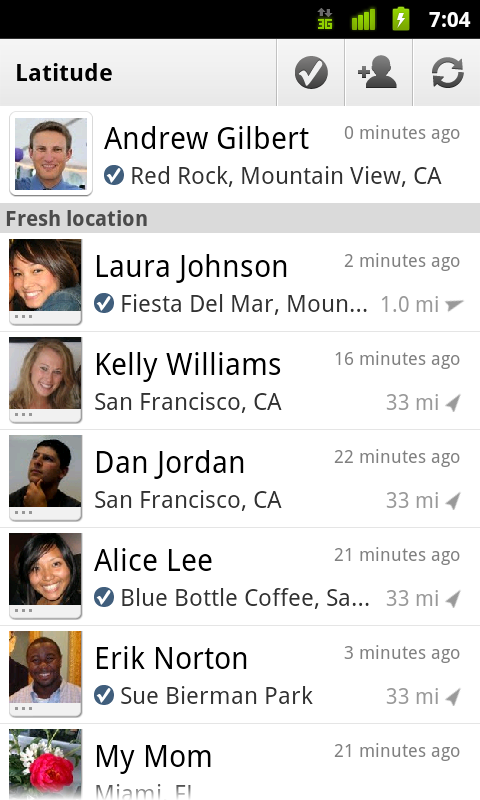
We first introduced Google Latitude to help you stay in touch with your friends and family by making it easy to share where you are. For the 10 million people actively using Latitude each month, this “where” has been a location on a map. Starting today in Google Maps 5.1 for Android, you can also connect that location to a real place by checking in there using Latitude.

Connecting your location with places
You can still use Latitude to automatically update and share your location, but check-ins let you add context to the location—like captions to a photo. For example, I live in San Francisco but often travel around the world. Until today, sharing my location let friends and family know if I was across the globe or in their neighborhood. Now, check-ins let them see the cool restaurant I’m trying in Taipei or join me for a latte at the cafe nearby.

See where your friends are on a map and where they’re checking in.

Not your typical check-ins
Because you can use Latitude to automatically detect your location, we’ve added a few twists to checking in to make it really easy:
  • Notifications: Turn on check-in notifications in Latitude’s settings and get a notification to check in at a nearby place once you arrive. Never forget to check in again.
  • Automatic check-ins: Choose to automatically check in at specific places you designate, and you’ll be checked in when you’re there. You can talk to friends or finish your bagel without fumbling with your phone.
  • Check out: Once you leave, Latitude knows to automatically check you out of places so friends aren’t left guessing if you’re still there.


Explore your world one check-in at a time
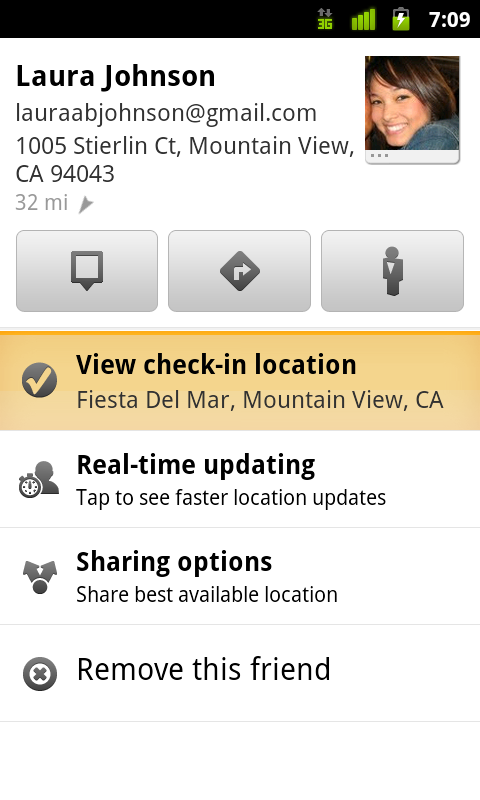
Latitude is built right into Google Maps for Android so check-ins work across Latitude and Maps seamlessly. For example, check in at that new hamburger joint, and you’ll see its Place page with reviews to help you order. When friends check in at a place, you can go straight from their Latitude profile to its Place page to learn about it, fire up Google Maps Navigation (Beta) for turn-by-turn directions to them, and more.

You can also check in at a favorite place to earn special status there; you’ll see if you’ve become a “Regular,” a “VIP” or a “Guru” on its Place page. Keep checking in to hold onto your status or reach the next level.

Latitude check-ins are built right into Google Maps and Place pages.

Of course, we thought carefully about how to make checking in to places quick and easy while giving you control over your privacy. Just like when sharing your location with Latitude, checking in is 100% opt-in, and you can choose to share any check-in with your friends on Latitude, publicly on the web and your Google profile, or just yourself. Learn more about checking in and managing your check-ins with Latitude in the Help Center. Coming later this week, you’ll also be able to see your complete history of check-ins using the optional History tab at google.com/latitude from your computer.

Choose options for individual check-ins or turn on and off notifications in the Latitude settings.

Start checking in by downloading the latest Google Maps from Android Market (on Android 1.6+; tap here if you're on your phone) and then joining Latitude from the main menu. You can check in everywhere Maps and Latitude are already available. If you’re using the new Latitude app for iPhone, you’ll see your friends’ check-ins, and we’ll update the app soon so you can check in too.

Just the beginning...
Checking in from Latitude is just one step in helping you connect the places you go with the people you care about. We believe in letting you use or share your location however you like, and we’re working on making location and check-ins useful in more places—across Google and the web.

Posted by Joe LaPenna, Software Engineer, Google Latitude Team


"

Your Entire Music Library in the Cloud, Streamed to your Android Device, Announced Tomorrow

Your Entire Music Library in the Cloud, Streamed to your Android Device, Announced Tomorrow: "

What do you think of that? Sound reasonable to you? Tomorrow there’s going to be a mainly Android Honeycomb-based event hosted by Google, (and we’re gonna be there,) and inside sources are saying that included in this event is going to be an announcement that Google’s Android Market’s music library is now open for browsing and purchasing. The iTunes killer. Maybe not, but if anyone could do it, Google could. In addition to this, instant downloads Over The Air to your Android device, both for apps and for music.


Sources speaking with Android and Me that’ve apparently provided accurate info on Sprint in the past is now confirming the idea that tomorrow’s announcements will include a web-based Android Marketplace “on par with that of the Apple App Store or even better.”


Along these lines also is a keynote speech by Vic Gundorta at 2010′s Google I/O conference in which he shows this online Android Marketplace, the ability to hit download to have it sent directly to your Android handheld device, and the music market. In this speech he notes that they’ve joined forces with Simplified Media and not only will be introducing music downloads directly to your phone, but your entire music library (of non-DRM music) in the cloud, able to be played from any of your Android devices.


Take a look at a video of the segment where Gundorta mentions music here:


Think this is part of the event tomorrow? Stick with us as we reveal all of Google and Androids 3.0 secrets and beyond as we’ll be right there live at the event sending you everything we’ve got.


Be there!


)

"

Tuesday, 1 February 2011

Further reflections on discrimination

Further reflections on discrimination: "FlatEarth.gif

[Image, via Wikipedia: The Flammarion engraving (1888) depicts a traveller who arrives at the edge of a flat Earth and sticks his head through the firmament.]


A scientific experiment avoids confusion by holding as much as possible constant, while systematically varying some factor of interest. When you are trying to think through a complex train of thought it can be helpful to do something similar, especially when sorting out separate arguments that might be confused. My previous Boing Boing post, 'Should employers be blind to private beliefs?,' could be seen as raising four separate questions. These were in danger of being confused with each other, and it is helpful to consider them one at a time, setting the others on one side temporarily--the equivalent of holding other variables constant in an experiment. The four questions were:


1. Should Martin Gaskell have been turned down by the University of Kentucky? I got rid of this one by explicitly stating that I was not concerned with it. I shall continue to ignore it here.


2. Should employers ever discriminate on grounds of the beliefs of candidates? If the answer to this is no, there is no point in going on. I tried to dispose of it by reductio ad absurdum. I postulated hypothetical extremes (flat earth geographer, stork theory doctor, astronomer who thinks Mars is a mongoose egg). I presumed that everybody would agree to discriminate against such obviously preposterous extremes, and that we would therefore have a non-controversial baseline from which to move on to more subtle questions. As it turned out, I was wrong: I underestimated the emotive impact of the very word 'discrimination'. I may also have underestimated the power of the relativist doctrine that all opinions are equally worthy of respect. But in any case my purpose was not to erect a straw man and knock it down. I wanted to find a baseline of agreement, which would enable us to set Question 2 on one side, while we went on to the other questions.


3. Should employers discriminate on grounds of religion per se? Here, I had thought we could establish a baseline agreement that there are at least some religious beliefs that nobody would wish to discriminate against. None of us, certainly not I, would rule out Georges Lemaître when employing a physics professor, on the grounds that he was a Catholic priest. But there could be beliefs, which might happen to have their origins in religion, but which some people might otherwise have considered grounds for rejecting a candidate under Question 2. We are not talking about discriminating against religion per se but against a counterfactual belief that happens to come from religion, and this leads me to Question 4:


4. Suppose you are one of those who will allow a yes answer to Question 2, and are prepared to contemplate at least some discrimination, say against flat-earthers. Would you allow religion to serve as a special, privileged, protective shield against such otherwise-agreed discrimination: a shield not available to non-religious flat-earthers? Should those who are prepared to discriminate against stork-theorists make an exception if it turns out that their storkism stems from religion? In other words, should we discriminate against non-religiously inspired storkers and, implicitly by comparison, discriminate in favour of religiously-inspired storkers? As I understand it, the law, at least in some countries, does sanction exactly that. You can legally rule a candidate out because he believes in something obviously absurd, but not if he can hide his absurd belief behind the protective screen of religion. This makes Question 4 a worthwhile question. But it is a question that simply doesn't arise for anybody who answers No to Question 2, which is why it was worth getting that question out of the way first.


But my main purpose today is to move on and raise - though not necessarily answer - some further issues raised by this whole discussion, which I think are genuinely interesting.

To start with, there is the intriguing psychological question of the extent to which the human mind is capable of compartmentalizing itself. A good example is the astronomer who publishes respectable work, involving calculations assuming that the universe is billions of years old, while privately holding the contradictory belief that it is only thousands of years old. If such split-mindedness is a real psychological phenomenon, that is a fascinating fact about the human brain, well worth studying in its own right. How closely intertwined are the mutually contradictory beliefs? Are they literally held simultaneously, or does the victim believe one of them on some days and the other one on other days, so that he is never literally in a state of believing a contradiction? Is this related to the well-attested multiple personality syndrome? Are there any limits to the degree of contradiction that one mind is capable of tolerating inside itself? Should the simultaneous holding of mutually contradictory factual beliefs be regarded as evidence of insanity? Do we all from time to time, in a mild way, accommodate mutually contradictory beliefs inside our heads?


Then there are some important questions of law. Why should religion in particular be singled out as grounds for shielding beliefs from scrutiny? If a South African enthusiast for apartheid pleaded that his insistence on racial separation stemmed from his deeply sincere adherence to the Dutch Reformed Church, should we respect his racialism in a way that we would not if he traced it to a deeply sincere prejudice instilled into him by his parents when he was at a sensitive age?


Should the law take a more lenient view of a wife-beater if he could plead that his behaviour was mandated by his holy book? This was explicitly done in recent years by a (female) judge in Germany. As the New York Times reported, Judge Christa Datz-Winter 'cited the verse in the Koran that speaks of a husband's prerogatives in disciplining his wife'. The judge further justified her decision on the grounds that 'In this cultural background, it is not unusual that the husband uses physical violence against the wife.' This judge not only allowed religion to over-rule human decency, she also allowed it to over-rule the law of Germany in the particular case of a couple who were Muslims. The New York Times went on to comment, 'For some, the greatest damage done by this episode is to other Muslim women suffering from domestic abuse. Many are already afraid of going to court against their spouses. There have been a string of so-called honor killings here, in which Turkish Muslim men have murdered women.'


How about clitoridectomy? Should the law protect girls from such mutilation except in cases where the mutilator pleads religious justification? In Britain today this barbaric custom is practiced. It is against the law, but the police turn a blind eye for fear of being thought 'Islamophobic'.


Should we exempt halal and kosher slaughterhouses from prosecution under laws against cruelty to animals, on grounds that religious considerations trump humanitarian ones? Such exemption is widely demanded and accepted but never, as far as I have seen, coherently justified.


During the Vietnam war, conscientious objectors had to prove to a draft board that their objection really was conscientious. By far the easiest way to prove this was to plead religious conviction, but only if the religious conviction was long-established. A young man whose parents were Quakers had no trouble at all. I suspect that a young man who had written a PhD thesis on the moral philosophy of pacifism might have been given a harder time. If so, this needs to be debated. Why does our society, as represented in our laws, give religious conscience a free pass, where a secular philosophical conscience has to work really hard to earn it?


Moving on from law, we have the issue of fact versus opinion. There are those of us who see a radical distinction between a factual belief like 'I believe the Earth is flat' and an opinion like 'I believe Richard Nixon was a bad man.' Some relativists, on the other hand, blur fact and opinion, see no reason to privilege fact over opinion, and take the view that all opinions are equally valid and equally worthy of respect.


One of the reasons I am willing to describe flat-earthism and young-earthism as ridiculous is that they are contradicted by publicly observable facts. But there are other beliefs about fact, including scientific fact, that are not obviously true or false, perhaps because the evidence is incomplete or open to varying interpretation, or perhaps because terms are not clearly defined. 'I believe the Permian extinction was caused by a meteorite impact' is a belief about a matter of fact, but neither it nor its negation are obviously silly in the way flat-earthism is. I think it would be very wrong to discriminate against a geologist on grounds of his belief about the Permian extinction. There might be other factual beliefs that are intermediate, where we might have a genuine argument. Some might nominate climate change denial as an example. Others might suggest Holocaust denial as a borderline intermediate case, a bit further towards the loony end of the spectrum.


By choosing flat-earthism and storkism as my hypothetical examples, I was trying to establish a baseline, setting aside the argument over whether discrimination of any kind is ever permissible. The purpose of choosing these palpably ridiculous hypotheticals was to make it possible to move on to the more difficult cases, where we might hope to have an interesting discussion.

If there are some people who cannot accept even this baseline, and reject all discrimination of any kind, they presumably will have nothing to contribute to the supplementary questions I have raised in the latter part of this article. But I hope others may find them worthy of honest debate.


"

Facebook Averaged Almost 8 New Registrations Per Second In 2010

Facebook Averaged Almost 8 New Registrations Per Second In 2010: "

Candytech, a Czech company that helps companies create and measure Facebook marketing campaigns, has gathered a wealth of Facebook-specific data over the years via its statistics portal SocialBakers.


The company has put together this great infographic, offering an overview of Facebook’s growth and population throughout 2010. Some key stats:


- Facebook ballooned from 337 million to 585 million users in 2010

- That means roughly 7.9 new users signed up every second of the year, on average

- USA and the UK are in the top 3 countries, but Indonesia is second with 32.1 million users

- The top 10 countries make up nearly 60% of all users

- The large majority of users is between 18 and 34 years old

- … but the fastest growing age group is 65+ (+124%)

- Three food brands (Coca-Cola, Starbucks and Oreo) make up the top 3 brands on Facebook

- Michael Jackson may have passed away, but his legacy is strong: 26.2 million fans


"